How to review product edits before publishing them
Walk through a product draft field by field. Catch unsupported claims, check variant facts and photos, and verify approved changes on the destination page.
 By Dondo5 min read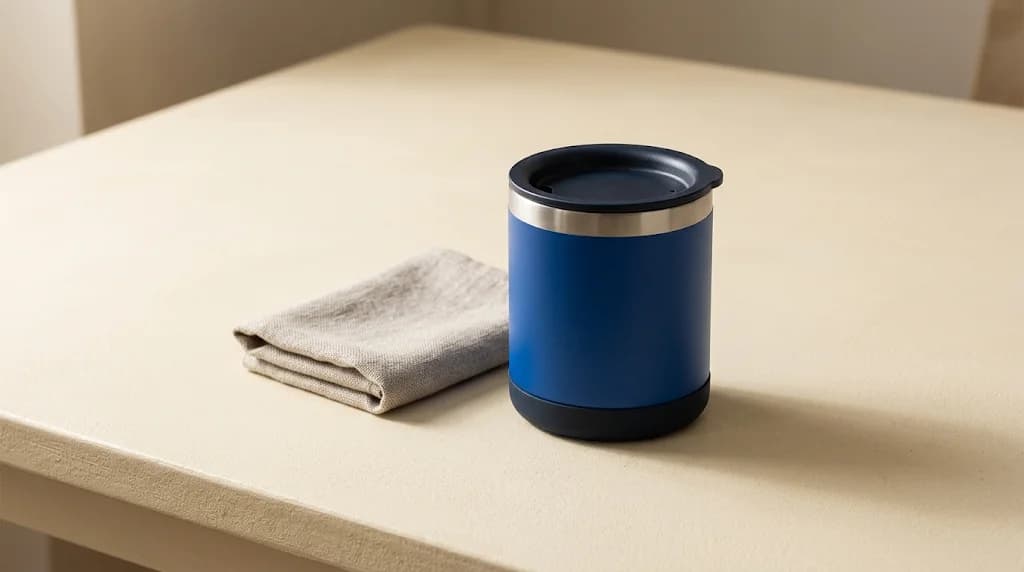
A draft can read better than the original and still describe the wrong product. An appealing insulation claim, a larger capacity borrowed from another variant, or a photo showing an extra accessory can all survive a quick proofreading pass.
In Dondo, open the draft alongside the original and review what changed. Approval and publication are separate steps. That gives you a chance to correct the product story before sending supported fields to a store or using an export.
Here is a field-by-field review you can apply to a small group before extending the work across a collection.
Establish what the product actually is
This worked example is illustrative. The product, source records, and proposed copy are fictional.
A merchant sells a commuter mug in two sizes. The product being reviewed is the 350 ml blue variant. Its packaging and supplier sheet confirm a stainless steel body, a fitted lid, hand-wash care, and a removable silicone base. The 500 ml version has a different SKU. The supplier has provided no evidence for a guaranteed heat-retention duration or a leakproof claim.
The existing listing says “Travel cup” and “A cup for busy days.” Its title is vague, and its description leaves useful details out. Those are good reasons to request Copywriter work. They do not supply evidence for additional performance claims.
Have the correct SKU and source specifications at hand while you review. If the records disagree, resolve the disagreement before approving the affected wording.
Read the title for identity and promises
Suppose a proposed title reads:
Leakproof insulated commuter mug, 500 ml, blue
The capacity belongs to another variant. “Leakproof” and “insulated” both need confirmation for this model.
A revision grounded in the available facts is:
Stainless steel commuter mug, 350 ml, blue
It identifies the item and the selected variant. Keep a useful search phrase when it describes the real product. Adding every related term makes the title harder to check and can introduce properties the item does not have.
Compare the revised title with the variant selector and the image. If they identify different sizes, an accurate sentence alone will not fix the page.
The Copywriter can do this for your store.
Rewrites titles, descriptions and bullets from what shoppers search.
Score my products freeSeparate useful explanation from an overclaim
An illustrative description draft might say:
Keep coffee hot all day with this leakproof mug. The 500 ml capacity makes it ideal for long commutes. Put it in the dishwasher after use.
Every sentence introduces a problem. Heat retention and leak resistance need evidence. The capacity is wrong. Dishwasher care contradicts the supplied instructions.
Replace it with wording you can stand behind:
This blue commuter mug has a 350 ml capacity and a stainless steel body. It includes a fitted lid and a removable silicone base. Hand wash according to the supplied care instructions.
The shorter version still leaves a practical question: can buyers carry it loose in a bag? Ask the supplier for the applicable guidance. Until it is confirmed, avoid suggesting that use in the copy or imagery.
Dondo uses product facts, brand voice, and buyer context to prepare drafts. Review that context when several drafts repeat the same unsupported assumption. A suggested buyer persona is an inference; it cannot establish that a mug is suitable for a particular use.
For broader writing guidance, see the product description guide.
Review search copy as closely as visible copy
A correct description can sit beside an incorrect SEO description. Check both where supported.
For the example mug, a usable search title is “Blue stainless steel commuter mug, 350 ml.” A search description could read: “See the blue 350 ml commuter mug with a stainless steel body, fitted lid, and removable silicone base. Check its details and hand-wash care.”
Read those fields without looking at the main description. Would they still be true? Remove claims such as “spill-proof travel” even if they sound like useful search terms.
SEO and AI search readiness start with the same factual review here: the page should answer product questions accurately. A content score does not demonstrate ranking improvement or inclusion in AI answers.
Inspect what the photo implies
If you request Photographer work using existing product photos, compare the resulting visual with the source item. Check the lid shape, blue finish, base, and proportions. A generated image showing a handle would depict a feature this mug does not have.
Also inspect the scene. A mug tipped into a bag may imply spill resistance even when the caption avoids that claim. A second mug beside it may confuse the pack quantity. Choose or revise the image so a buyer can understand what arrives.
Where alternative text is supported, describe the actual image and variant. Read the product image guide for more image review considerations.
Finish one group, then check the destination
Review a small group that includes the variants you are likely to confuse. Check each proposed change; reading one mug does not establish that all sizes are correct. Choose a group within your active Expert allowance; the FAQ explains how enabled products work.
Approve the changes you want to keep, then use the supported publication or export route. Available fields depend on the connection. Check the operation result before assuming the destination updated.
Open the actual product page and select the blue 350 ml variant. Read the title, description, care details, and image together. If you manage a Google product feed, compare it with the landing page too: Google Merchant Center identifies conflicting website and feed data as a source of product issues.
Use Dondo to prepare your next product drafts, with the source facts ready for review. Expand the group after you have checked what buyers actually see.
The Copywriter can do this for your store.
Rewrites titles, descriptions and bullets from what shoppers search.
Score my products freeSources and review
- Dondo frequently asked questions · Dondo · 2026-10-20
- Product data specification · Google Merchant Center · 2026-10-20
Review product copy with Dondo
Explore the solutionRelated Posts
 Ecommerce and Dropshipping Guide
Product description optimization guide
A practical, evidence-backed guide to product description optimization guide.
2 min read
 Ecommerce and Dropshipping Guide
AI product images for ecommerce
A practical, evidence-backed guide to AI product images for ecommerce.
2 min read
 Ecommerce and Dropshipping Guide
How to adapt one product for different sales channels
Keep one verified set of product facts while adapting titles, descriptions, attributes, and images for each store or marketplace. Follow a worked example.
5 min read
 Ecommerce and Dropshipping Guide
How to choose your first products to improve with Dondo
Turn your first Analyst findings into a manageable product group. Weigh business importance, verified content gaps, stock, and facts you still need to confirm.
5 min read