How to review AI product photos before publishing
Compare an AI product photo with the item you sell. Check shape, color, labels, scale, and included accessories before choosing where to use the image.
 By Dondo5 min read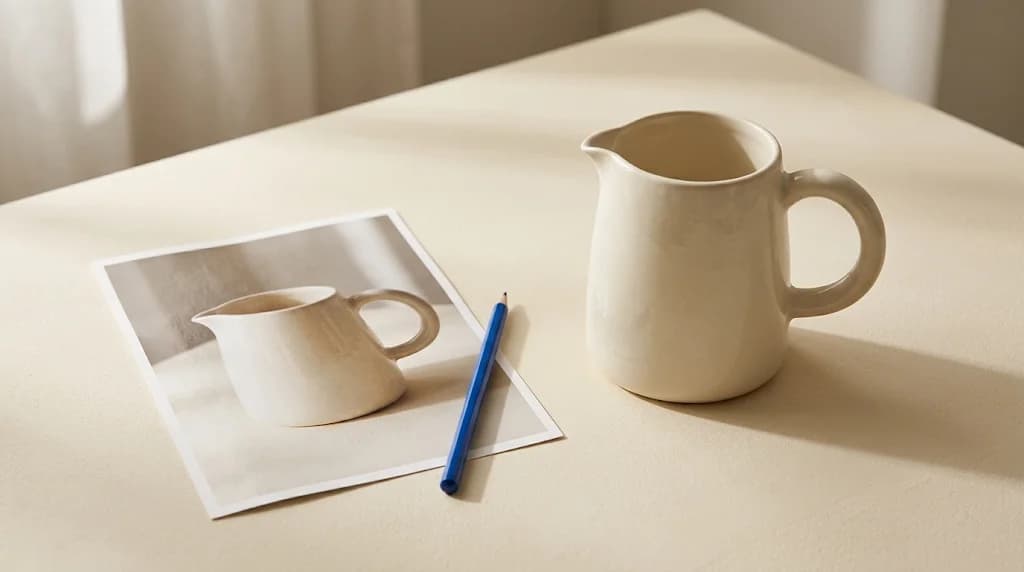
A convincing kitchen scene can still show the wrong pitcher. The handle may be narrower, the glaze smoother, or matching cups may appear even though you sell the pitcher alone. Review the product inside the scene before judging the scene itself.
Keep a genuine source photo of the exact item beside every AI draft. Your catalog facts and the physical product settle questions the source image cannot answer. A generated image should never become the evidence you use to verify another generated image.
Put the exact variant beside the draft
Open the original at a size that lets you inspect edges and small markings. Confirm the SKU, color, size, and included quantity before comparing images. A photo of last season's packaging or a different finish is a weak reference even when the product name matches.
Use additional genuine photos when the draft exposes a side the source does not show. If you only have a front view of a backpack, you cannot confirm an invented rear pocket from that image. Request a better source photo or choose a composition that keeps the unknown area out of view.
For an illustrative example, suppose a store sells one cream ceramic pitcher with a rounded handle and a small pouring spout. Its specification says one liter, and the package contains only the pitcher. Write those facts beside the reference. They give the reviewer specific things to check instead of a general instruction to make the image look realistic.
Inspect the product before the background
Work around the object slowly. These checks catch different kinds of errors:
- Compare the silhouette, proportions, handle openings, seams, buttons, and other construction details. Count parts that repeat, such as straps or chair legs.
- Check color and finish against the reference. Warm lighting can change the appearance of a surface; it should not turn a cream glaze into orange.
- Read visible packaging, logos, labels, and markings. Reject scrambled letters or claims that do not appear on the real package.
- Count the items shown. A single-item listing should not quietly become a set.
- Look at scale relative to hands, tables, and nearby objects. Use verified dimensions when scale matters. A generated hand does not prove an object is the right size.
- Separate included accessories from props. A stand, charger, lid, or carrying case can look like part of the purchase even when intended as decoration.
Then inspect contact points and surroundings. Floating objects, broken shadows, or a strap passing through a table need correction too. These faults are easier to notice after you have established that the product itself matches.
The Copywriter can do this for your store.
Rewrites titles, descriptions and bullets from what shoppers search.
Score my products freeChoose reject, fix, or approve for a stated use
Apply the checks to the pitcher drafts:
| Draft | Decision | Next action |
|---|---|---|
| The pitcher has a square handle and an invented brand label | Reject | Return to the genuine source and request another draft that preserves the visible construction and markings |
| The pitcher matches, but matching cups suggest a set | Fix | Remove the cups or choose another composition, then inspect the full replacement image |
| The pitcher matches the source, the scene contains no confusing accessories, and the crop keeps the handle and spout visible | Approve for the reviewed campaign placement | Check the destination's image rules and the final uploaded crop |
Avoid treating a successful correction as permission to skip another review. A new draft can remove the cups and change the handle. Compare the entire object again.
If a label repeatedly becomes unreadable, use a genuine close-up for the detail image. Some products need original photography to communicate a small mark or construction detail reliably. Keeping that photo is a valid production decision.
Check campaign context against the destination
A lifestyle image may suit an Instagram campaign while being unsuitable as a marketplace's main product image. Decide where the visual will appear before approving it. A summer picnic setting communicates a use occasion; it cannot establish that a container is insulated, leakproof, or safe for hot food.
For Google product listings, the Merchant Center image specification requires the primary image to show the exact item being sold and sets rules about extra products and promotional overlays. It also requires generative AI images to retain the applicable AI source metadata. Check the current specification for the destination and preserve required metadata through your editing and upload workflow.
For the surrounding listing review, use the product listing optimization checklist. The image, title, variant selection, and description should all describe the same purchase. The AI product images guide covers broader catalog and channel considerations.
Review Photographer drafts in Dondo
Dondo Photographer creates product visuals using your existing photos. Start with the correct product images and give the scene a clear purpose, such as showing a bag on a plain surface or placing a candle in a reading setting. Keep product facts separate from styling instructions.
Review the output against the sources before approving it. Dondo's current FAQ describes review and approval as part of the workflow; using content through an available publishing or export option is a separate step. Check the destination result as well, including mobile crops and which variant receives the image.
For your next visual, open Dondo, choose a product with clear source photos, and compare the first draft with the item you actually ship. See Pricing for paid Expert options.
The Copywriter can do this for your store.
Rewrites titles, descriptions and bullets from what shoppers search.
Score my products freeSources and review
- Image link [image_link] · Google Merchant Center · 2026-10-20
- Frequently asked questions · Dondo · 2026-10-20
Create product visuals with Dondo Photographer
Explore the solutionRelated Posts
 Ecommerce and Dropshipping Guide
AI product images for ecommerce
A practical, evidence-backed guide to AI product images for ecommerce.
2 min read
 Ecommerce and Dropshipping Guide
Product listing optimization checklist
A practical, evidence-backed guide to product listing optimization checklist.
2 min read
 Ecommerce and Dropshipping Guide
How to adapt one product for different sales channels
Keep one verified set of product facts while adapting titles, descriptions, attributes, and images for each store or marketplace. Follow a worked example.
5 min read
 Ecommerce and Dropshipping Guide
How to choose your first products to improve with Dondo
Turn your first Analyst findings into a manageable product group. Weigh business importance, verified content gaps, stock, and facts you still need to confirm.
5 min read