Product image alt text examples for an ecommerce gallery
Write useful alt text for main product photos, detail shots, lifestyle images, and variants. Compare weak examples with descriptions grounded in what is visible.
 By Dondo5 min read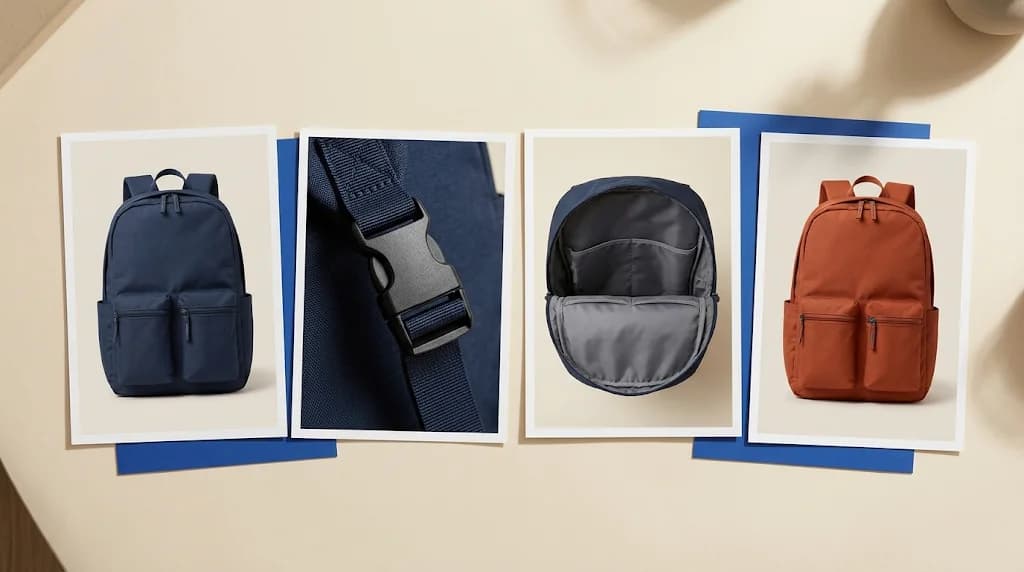
Five photos of one backpack should not all have the alt text “backpack.” The front view identifies the item. The open compartment shows its layout. The close-up shows the buckle. Give each meaningful image a description of the information it adds.
Alt text is a text alternative for an image in its page context. The W3C WAI decision tree recommends a brief description for an informative photograph. Purely decorative images and some images redundant with nearby text can need an empty alt attribute. Decide what the image does on the page before writing.
Start with the object and the useful visible detail
For a product gallery, name the product and describe what distinguishes that view. Color, orientation, an open compartment, or a visible fastening may be useful. A description of every shadow usually adds little.
The examples below are illustrative. They assume the images show the stated details; adapt them to your actual photographs.
| Image | Weak alt text | More useful alt text |
|---|---|---|
| Main photo of a navy backpack | “Best travel backpack buy now” | “Navy backpack shown from the front with two outer zip pockets” |
| Detail shot of its closure | “Backpack detail” | “Close-up of the backpack's black side-release buckle” |
| Open interior | “Navy backpack” | “Open backpack showing a padded rear compartment and two interior pockets” |
| Lifestyle photo on a person | “Amazing backpack for every adventure” | “Person wearing the navy backpack with both shoulder straps” |
| Separate rust-colored variant | “Backpack blue rust green” | “Rust-colored backpack shown from the front” |
The stronger examples let someone distinguish the pictures without borrowing sales claims from the description. “Padded rear compartment” describes what is visible. “Fits every laptop” would need product evidence and still would not explain the image well.
Use a product's brand or model when it helps identify the item. You do not need to repeat a long catalog title in every description. If a gallery contains several similar products, distinguishing model names become more useful than they would be on a single-product page.
Keep specifications in the product copy
A photo of a bottle cannot establish that it keeps drinks cold for a particular number of hours. A close-up of fabric cannot certify its fiber composition. Put verified performance, capacity, material, and care information in the appropriate product fields and visible copy.
For an illustrative bottle image, “Sage-green bottle with its screw cap removed” is a useful description. “Sustainable leakproof bottle that keeps water cold all day” mixes claims with an image description. Even if some claims are documented, they do not explain the visible view.
If the image itself contains essential text, account for that information. WAI's decision tree distinguishes text already available nearby from text conveyed only in an image. A product care chart may need its instructions available as real page text; compressing the whole chart into an alt field can make it difficult to use.
For help separating specifications from selling language, read the product description optimization guide.
The Copywriter can do this for your store.
Rewrites titles, descriptions and bullets from what shoppers search.
Score my products freeUse search terms where they describe the picture
Google Search Central says it uses alt text together with image analysis and page content to understand an image. Its guidance recommends useful descriptions in context and warns against keyword stuffing.
“Navy roll-top backpack with the top closure unrolled” includes the product type naturally. Adding “best backpack cheap backpack travel backpack sale” gives the reader little information about the photo. A sentence written for someone who cannot see the picture is a better starting point than a list of search queries.
Alt text is one part of image SEO. Google also discusses relevant surrounding text and discoverable image elements. Changing one field does not guarantee a ranking improvement. Treat clear product information as part of your wider SEO and AI search work, and avoid promising AI answer placement from alt text alone.
Check the gallery in its actual page context
Before saving the descriptions, view the selected variant and walk through the images in order. Check that the alt text changes when the displayed image changes. A rust variant paired with a navy description needs correction even when both descriptions read well separately.
Pay attention to image controls. A thumbnail that acts as a button may need an accessible name that explains its action. WAI's decision tree treats functional images differently from informative photos. Ask whoever maintains your theme to check gallery controls if their purpose is unclear with a keyboard or screen reader; changing the photo's alt text may not fix the control.
Finally, remove descriptions copied from a previous image that no longer applies. Review new AI visuals against genuine product photos before describing them. The AI product images guide covers that accuracy check.
Check support before planning a catalog update
Dondo's FAQ includes image alternative text among the fields it works on where supported. The fields available for review and publication depend on the connected platform. Check your connection's available actions before planning an alt-text update across your catalog.
Start with a small group of products. Review the descriptions against the images, approve the changes you want, and use the available publishing or export workflow. Inspect the resulting storefront rather than assuming approval updated the page.
Open Dondo to review product content and identify gaps. The initial Analyst scan has a free allowance; paid Expert options are listed on Pricing. Keep a copy of your original image descriptions until you have checked the destination result.
The Copywriter can do this for your store.
Rewrites titles, descriptions and bullets from what shoppers search.
Score my products freeSources and review
- An alt Decision Tree · W3C Web Accessibility Initiative · 2026-10-20
- Google image SEO best practices · Google Search Central · 2026-10-20
- Frequently asked questions · Dondo · 2026-10-20
Review product content with Dondo
Explore the solutionRelated Posts
 Ecommerce and Dropshipping Guide
AI product images for ecommerce
A practical, evidence-backed guide to AI product images for ecommerce.
2 min read
 Ecommerce and Dropshipping Guide
Product description optimization guide
A practical, evidence-backed guide to product description optimization guide.
2 min read
 Ecommerce and Dropshipping Guide
How to adapt one product for different sales channels
Keep one verified set of product facts while adapting titles, descriptions, attributes, and images for each store or marketplace. Follow a worked example.
5 min read
 Ecommerce and Dropshipping Guide
How to choose your first products to improve with Dondo
Turn your first Analyst findings into a manageable product group. Weigh business importance, verified content gaps, stock, and facts you still need to confirm.
5 min read